

To stop a network-based attack, any interference with a portion of the attack pattern is enough to prevent it from succeeding. Which statement is correct regarding the Cortex XDR Analytics module?
It does not interfere with any portion of the pattern on the endpoint.
It interferes with the pattern as soon as it is observed by the firewall.
It does not need to interfere with the any portion of the pattern to prevent the attack.
It interferes with the pattern as soon as it is observed on the endpoint.
The correct statement regarding the Cortex XDR Analytics module is D, it interferes with the pattern as soon as it is observed on the endpoint. The Cortex XDR Analytics module is a feature of Cortex XDR that uses machine learning and behavioral analytics to detect and prevent network-based attacks on endpoints. The Cortex XDR Analytics module analyzes the network traffic and activity on the endpoint, and compares it with the attack patterns defined by Palo Alto Networks threat research team. The Cortex XDR Analytics module interferes with the attack pattern as soon as it is observed on the endpoint, by blocking the malicious network connection, process, or file. This way, the Cortex XDR Analytics module can stop the attack before it causes any damage or compromise.
The other statements are incorrect for the following reasons:
A is incorrect because the Cortex XDR Analytics module does interfere with the attack pattern on the endpoint, by blocking the malicious network connection, process, or file. The Cortex XDR Analytics module does not rely on the firewall or any other network device to stop the attack, but rather uses the Cortex XDR agent installed on the endpoint to perform the interference.
B is incorrect because the Cortex XDR Analytics module does not interfere with the attack pattern as soon as it is observed by the firewall. The Cortex XDR Analytics module does not depend on the firewall or any other network device to detect or prevent the attack, but rather uses the Cortex XDR agent installed on the endpoint to perform the analysis and interference. The firewall may not be able to observe or block the attack pattern if it is encrypted, obfuscated, or bypassed by the attacker.
C is incorrect because the Cortex XDR Analytics module does need to interfere with the attack pattern to prevent the attack. The Cortex XDR Analytics module does not only detect the attack pattern, but also prevents it from succeeding by blocking the malicious network connection, process, or file. The Cortex XDR Analytics module does not rely on any other response mechanism or human intervention to stop the attack, but rather uses the Cortex XDR agent installed on the endpoint to perform the interference.
What is the purpose of the Cortex Data Lake?
a local storage facility where your logs and alert data can be aggregated
a cloud-based storage facility where your firewall logs are stored
the interface between firewalls and the Cortex XDR agents
the workspace for your Cortex XDR agents to detonate potential malware files
The purpose of the Cortex Data Lake is to provide a cloud-based storage facility where your firewall logs are stored. Cortex Data Lake is a service that collects, transforms, and integrates your enterprise’s security data to enable Palo Alto Networks solutions. It powers AI and machine learning, detection accuracy, and app and service innovation. Cortex Data Lake automatically collects, integrates, and normalizes data across your security infrastructure, including your next-generation firewalls, Prisma Access, and Cortex XDR. With unified data, you can run advanced AI and machine learning to radically simplify security operations with apps built on Cortex. Cortex Data Lake is available in multiple regions and supports data residency and privacy requirements. References:
Cortex Data Lake - Palo Alto Networks
Cortex Data Lake - Palo Alto Networks
Cortex Data Lake, the technology behind Cortex XDR - Palo Alto Networks
CORTEX DATA LAKE - Palo Alto Networks
Sizing for Cortex Data Lake Storage - Palo Alto Networks
What is the purpose of the Unit 42 team?
Unit 42 is responsible for automation and orchestration of products
Unit 42 is responsible for the configuration optimization of the Cortex XDR server
Unit 42 is responsible for threat research, malware analysis and threat hunting
Unit 42 is responsible for the rapid deployment of Cortex XDR agents
Unit 42 is the threat intelligence and response team of Palo Alto Networks. The purpose of Unit 42 is to collect and analyze the most up-to-date threat intelligence and apply it to respond to cyberattacks. Unit 42 is composed of world-renowned threat researchers, incident responders and security consultants who help organizations proactively manage cyber risk. Unit 42 is responsible for threat research, malware analysis and threat hunting, among other activities12.
Let’s briefly discuss the other options to provide a comprehensive explanation:
A. Unit 42 is not responsible for automation and orchestration of products. Automation and orchestration are capabilities that are provided by Palo Alto Networks products such as Cortex XSOAR, which is a security orchestration, automation and response platform that helps security teams automate tasks, coordinate actions and manage incidents3.
B. Unit 42 is not responsible for the configuration optimization of the Cortex XDR server. The Cortex XDR server is the cloud-based platform that provides detection and response capabilities across network, endpoint and cloud data sources. The configuration optimization of the Cortex XDR server is the responsibility of the Cortex XDR administrators, who can use the Cortex XDR app to manage the settings and policies of the Cortex XDR server4.
C. Unit 42 is not responsible for the rapid deployment of Cortex XDR agents. The Cortex XDR agents are the software components that are installed on endpoints to provide protection and visibility. The rapid deployment of Cortex XDR agents is the responsibility of the Cortex XDR administrators, who can use various methods such as group policy objects, scripts, or third-party tools to deploy the Cortex XDR agents to multiple endpoints5.
In conclusion, Unit 42 is the threat intelligence and response team of Palo Alto Networks that is responsible for threat research, malware analysis and threat hunting. By leveraging the expertise and insights of Unit 42, organizations can enhance their security posture and protect against the latest cyberthreats.
What contains a logical schema in an XQL query?
Bin
Array expand
Field
Dataset
A logical schema in an XQL query is a field, which is a named attribute of a dataset. A field can have a data type, such as string, integer, boolean, or array. A field can also have a modifier, such as bin or expand, that transforms the field value in the query output. A field can be used in the select, where, group by, order by, or having clauses of an XQL query. References:
XQL Syntax
XQL Data Types
XQL Field Modifiers
In the Cortex XDR console, from which two pages are you able to manually perform the agent upgrade action? (Choose two.)
Asset Management
Agent Installations
Action Center
Endpoint Administration
To manually upgrade the Cortex XDR agents, you can use the Asset Management page or the Endpoint Administration page in the Cortex XDR console. On the Asset Management page, you can select one or more endpoints and click Actions > Upgrade Agent. On the Endpoint Administration page, you can select one or more agent versions and click Upgrade. You can also schedule automatic agent upgrades using the Agent Installations page. References:
Asset Management
Endpoint Administration
Agent Installations
What kind of the threat typically encrypts user files?
ransomware
SQL injection attacks
Zero-day exploits
supply-chain attacks
Ransomware is a type of malicious software, or malware, that encrypts user files and prevents them from accessing their data until they pay a ransom. Ransomware can affect individual users, businesses, and organizations of all kinds. Ransomware attacks can cause costly disruptions, data loss, and reputational damage. Ransomware can spread through various methods, such as phishing emails, malicious attachments, compromised websites, or network vulnerabilities. Some ransomware variants can also self-propagate and infect other devices or networks. Ransomware authors typically demand payment in cryptocurrency or other untraceable methods, and may threaten to delete or expose the encrypted data if the ransom is not paid within a certain time frame. However, paying the ransom does not guarantee that the files will be decrypted or that the attackers will not target the victim again. Therefore, the best way to protect against ransomware is to prevent infection in the first place, and to have a backup of the data in case of an attack123456
How does Cortex XDR agent for Windows prevent ransomware attacks from compromising the file system?
by encrypting the disk first.
by utilizing decoy Files.
by retrieving the encryption key.
by patching vulnerable applications.
Cortex XDR agent for Windows prevents ransomware attacks from compromising the file system by utilizing decoy files. Decoy files are randomly generated files that are placed in strategic locations on the endpoint, such as the user’s desktop, documents, and pictures folders. These files are designed to look like valuable data that ransomware would target for encryption. When Cortex XDR agent detects that a process is attempting to access or modify a decoy file, it immediately blocks the process and alerts the administrator. This way, Cortex XDR agent can stop ransomware attacks before they can cause any damage to the real files on the endpoint. References:
Anti-Ransomware Protection
PCDRA Study Guide
Phishing belongs to which of the following MITRE ATT&CK tactics?
Initial Access, Persistence
Persistence, Command and Control
Reconnaissance, Persistence
Reconnaissance, Initial Access
Phishing is a technique that belongs to two MITRE ATT&CK tactics: Reconnaissance and Initial Access. Reconnaissance is the process of gathering information about a target before launching an attack. Phishing for information is a sub-technique of Reconnaissance that involves sending phishing messages to elicit sensitive information that can be used during targeting. Initial Access is the process of gaining a foothold in a network or system. Phishing is a sub-technique of Initial Access that involves sending phishing messages to execute malicious code on victim systems. Phishing can be used for both Reconnaissance and Initial Access depending on the objective and content of the phishing message. References:
Phishing, Technique T1566 - Enterprise | MITRE ATT&CK® 1
Phishing for Information, Technique T1598 - Enterprise | MITRE ATT&CK® 2
Phishing for information, Part 2: Tactics and techniques 3
PHISHING AND THE MITREATT&CK FRAMEWORK - EnterpriseTalk 4
Initial Access, Tactic TA0001 - Enterprise | MITRE ATT&CK® 5
When reaching out to TAC for additional technical support related to a Security Event; what are two critical pieces of information you need to collect from the Agent? (Choose Two)
The agent technical support file.
The prevention archive from the alert.
The distribution id of the agent.
A list of all the current exceptions applied to the agent.
The unique agent id.
When reaching out to TAC for additional technical support related to a security event, two critical pieces of information you need to collect from the agent are:
The agent technical support file. This is a file that contains diagnostic information about the agent, such as its configuration, status, logs, and system information. The agent technical support file can help TAC troubleshoot and resolve issues with the agent or the endpoint. You can generate and download the agent technical support file from the Cortex XDR console, or from the agent itself.
The prevention archive from the alert. This is a file that contains forensic data related to the alert, such as the process tree, the network activity, the registry changes, and the files involved. The prevention archive can help TAC analyze and understand the alert and the malicious activity. You can generate and download the prevention archive from the Cortex XDR console, or from the agent itself.
The other options are not critical pieces of information for TAC, and may not be available or relevant for every security event. For example:
The distribution id of the agent is a unique identifier that is assigned to the agent when it is installed on the endpoint. The distribution id can help TAC identify the agent and its profile, but it is not sufficient to provide technical support or forensic analysis. The distribution id can be found in the Cortex XDR console, or in the agent installation folder.
A list of all the current exceptions applied to the agent is a set of rules that define the files, processes, or behaviors that are excluded from the agent’s security policies. The exceptions can help TAC understand the agent’s configuration and behavior, but they are not essential to provide technical support or forensic analysis. The exceptions can be found in the Cortex XDR console, or in the agent configuration file.
The unique agent id is a unique identifier that is assigned to the agent when it registers with Cortex XDR. The unique agent id can help TAC identify the agent and its endpoint, but it is not sufficient to provide technical support or forensic analysis. The unique agent id can be found in the Cortex XDR console, or in the agent log file.
Which statement is true for Application Exploits and Kernel Exploits?
The ultimate goal of any exploit is to reach the application.
Kernel exploits are easier to prevent then application exploits.
The ultimate goal of any exploit is to reach the kernel.
Application exploits leverage kernel vulnerability.
The ultimate goal of any exploit is to reach the kernel, which is the core component of the operating system that has the highest level of privileges and access to the hardware resources. Application exploits are attacks that target vulnerabilities in specific applications, such as web browsers, email clients, or office suites. Kernel exploits are attacks that target vulnerabilities in the kernel itself, such as memory corruption, privilege escalation, or code execution. Kernel exploits are more difficult to prevent and detect than application exploits, because they can bypass security mechanisms and hide their presence from the user and the system. References:
Palo Alto Networks Certified Detection and Remediation Analyst (PCDRA) Study Guide, page 8
Palo Alto Networks Cortex XDR Documentation, Exploit Protection Overview
Which statement is correct based on the report output below?
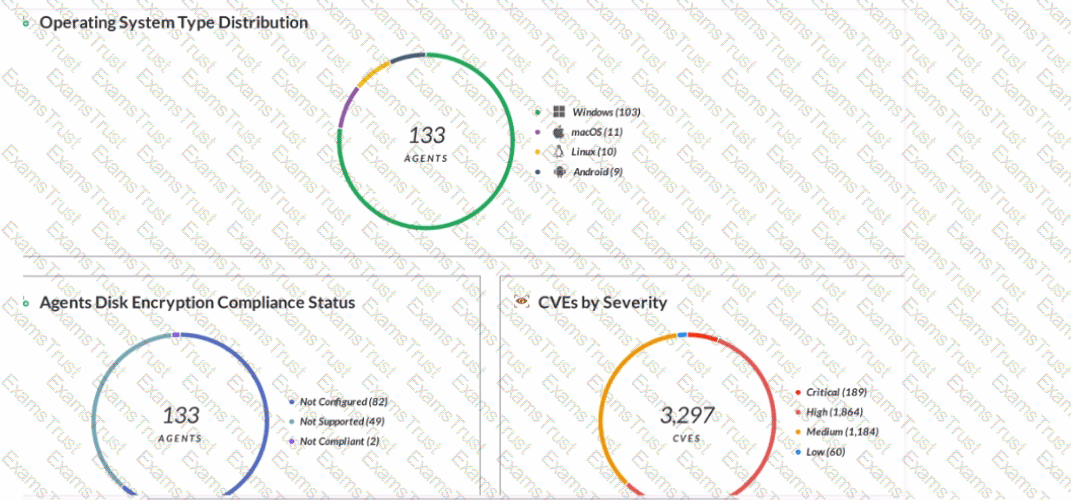
Host Inventory Data Collection is enabled.
3,297 total incidents have been detected.
Forensic inventory data collection is enabled.
133 agents have full disk encryption.
The report output shows the number of endpoints that have forensic inventory data collection enabled, which is a feature of Cortex XDR that allows the collection of detailed information about the endpoint’s hardware, software, and network configuration. This feature helps analysts to investigate and respond to incidents more effectively by providing a comprehensive view of the endpoint’s state and activity. Forensic inventory data collection can be enabled or disabled per policy in Cortex XDR. References:
Forensic Inventory Data Collection
Cortex XDR 3: Getting Started with Endpoint Protection
The Cortex XDR console has triggered an incident, blocking a vitally important piece of software in your organization that is known to be benign. Which of the following options would prevent Cortex XDR from blocking this software in the future, for all endpoints in your organization?
Create an individual alert exclusion.
Create a global inclusion.
Create an endpoint-specific exception.
Create a global exception.
A global exception is a rule that allows you to exclude specific files, processes, or behaviors from being blocked or detected by Cortex XDR. A global exception applies to all endpoints in your organization that are protected by Cortex XDR. Creating a global exception for a vitally important piece of software that is known to be benign would prevent Cortex XDR from blocking this software in the future, for all endpoints in your organization.
To create a global exception, you need to follow these steps:
In the Cortex XDR management console, go to Policy Management > Exceptions and click Add Exception.
Select the Global Exception option and click Next.
Enter a name and description for the exception and click Next.
Select the type of exception you want to create, such as file, process, or behavior, and click Next.
Specify the criteria for the exception, such as file name, hash, path, process name, command line, or behavior name, and click Next.
Review the summary of the exception and click Finish.
What is the purpose of targeting software vendors in a supply-chain attack?
to take advantage of a trusted software delivery method.
to steal users’ login credentials.
to access source code.
to report Zero-day vulnerabilities.
A supply chain attack is a type of cyberattack that targets a trusted third-party vendor who offers services or software vital to the supply chain. Software supply chain attacks inject malicious code into an application in order to infect all users of an app. The purpose of targeting software vendors in a supply-chain attack is to take advantage of a trusted software delivery method, such as an update or a download, that can reach a large number of potential victims. By compromising a software vendor, an attacker can bypass the security measures of the downstream organizations and gain access to their systems, data, or networks. References:
What Is a Supply Chain Attack? - Definition, Examples & More | Proofpoint US
What Is a Supply Chain Attack? - CrowdStrike
What Is a Supply Chain Attack? | Zscaler
What Is a Supply Chain Attack? Definition, Examples & Prevention
In Cortex XDR management console scheduled reports can be forwarded to which of the following applications/services?
Salesforce
Jira
Service Now
Slack
Cortex XDR allows you to schedule reports and forward them to Slack, a cloud-based collaboration platform. You can configure the Slack channel, frequency, and recipients of the scheduled reports. You can also view the report history and status in the Cortex XDR management console. References:
Scheduled Queries: This document explains how to create, edit, and manage scheduled queries and reports in Cortex XDR.
Forward Scheduled Reports to Slack: This document provides the steps to configure Slack integration and forward scheduled reports to a Slack channel.
Cortex XDR Analytics can alert when detecting activity matching the following MITRE ATT&CKTM techniques.
Exfiltration, Command and Control, Collection
Exfiltration, Command and Control, Privilege Escalation
Exfiltration, Command and Control, Impact
Exfiltration, Command and Control, Lateral Movement
Cortex XDR Analytics is a feature of Cortex XDR that leverages machine learning and behavioral analytics to detect and alert on malicious activity across the network and endpoint layers. Cortex XDR Analytics can alert when detecting activity matching the following MITRE ATT&CKTM techniques: Exfiltration, Command and Control, Lateral Movement, Execution, Persistence, Privilege Escalation, Defense Evasion, Credential Access, Discovery, and Collection. However, among the options given in the question, the correct answer is D, Exfiltration, Command and Control, Lateral Movement. These are three of the most critical techniques that indicate an advanced and persistent threat (APT) in the environment. Exfiltration refers to the technique of transferring data or information from the compromised system or network to an external location controlled by the adversary. Command and Control refers to the technique of communicating with the compromised system or network to provide instructions, receive data, or update malware. Lateral Movement refers to the technique of moving from one system or network to another within the same environment, usually to gain access to more resources or data. Cortex XDR Analytics can alert on these techniques by analyzing various data sources, such as network traffic, firewall logs, endpoint events, and threat intelligence, and applying behavioral models, anomaly detection, and correlation rules. Cortex XDR Analytics can also map the alerts to the corresponding MITRE ATT&CKTM techniques and provide additional context and visibility into the attack chain1234
When using the “File Search and Destroy” feature, which of the following search hash type is supported?
SHA256 hash of the file
AES256 hash of the file
MD5 hash of the file
SHA1 hash of the file
The File Search and Destroy feature is a capability of Cortex XDR that allows you to search for and delete malicious or unwanted files across your endpoints. You can use this feature to quickly respond to incidents, remediate threats, and enforce compliance policies. To use the File Search and Destroy feature, you need to specify the file name and the file hash of the file you want to search for and delete. The file hash is a unique identifier of the file that is generated by a cryptographic hash function. The file hash ensures that you are targeting the exact file you want, and not a file with a similar name or a different version. The File Search and Destroy feature supports the SHA256 hash type, which is a secure hash algorithm that produces a 256-bit (32-byte) hash value. The SHA256 hash type is widely used for file integrity verification and digital signatures. The File Search and Destroy feature does not support other hash types, such as AES256, MD5, or SHA1, which are either encryption algorithms or less secure hash algorithms. Therefore, the correct answer is A, SHA256 hash of the file1234
When creating a scheduled report which is not an option?
Run weekly on a certain day and time.
Run quarterly on a certain day and time.
Run monthly on a certain day and time.
Run daily at a certain time (selectable hours and minutes).
When creating a scheduled report in Cortex XDR, the option to run quarterly on a certain day and time is not available. You can only schedule reports to run daily, weekly, or monthly. You can also specify the start and end dates, the time zone, and the recipients of the report. Scheduled reports are useful for generating regular reports on the security events, incidents, alerts, or endpoints in your network. You can create scheduled reports from the Reports page in the Cortex XDR console, or from the Query Center by saving a query as a report. References:
Run or Schedule Reports
Create a Scheduled Report
What types of actions you can execute with live terminal session?
Manage Network configurations, Quarantine Files, Run PowerShell scripts
Manage Processes, Manage Files, Run Operating System Commands, Run Ruby Commands and Scripts
Apply patches, Reboot System, send notification for end user, Run Python Commands and Scripts
Manage Processes, Manage Files, Run Operating System Commands, Run Python Commands and Scripts
Live terminal session is a feature of Cortex XDR that allows you to remotely access and control endpoints from the Cortex XDR console. With live terminal session, you can execute various actions on the endpoints, such as:
Manage Processes: You can view, start, or kill processes on the endpoint, and monitor their CPU and memory usage.
Manage Files: You can view, create, delete, or move files and folders on the endpoint, and upload or download files to or from the endpoint.
Run Operating System Commands: You can run commands on the endpoint using the native command-line interface of the operating system, such as cmd.exe for Windows, bash for Linux, or zsh for macOS.
Run Python Commands and Scripts: You can run Python commands and scripts on the endpoint using the Python interpreter embedded in the Cortex XDR agent. You can use the Python commands and scripts to perform advanced tasks or automation on the endpoint.
When is the wss (WebSocket Secure) protocol used?
when the Cortex XDR agent downloads new security content
when the Cortex XDR agent uploads alert data
when the Cortex XDR agent connects to WildFire to upload files for analysis
when the Cortex XDR agent establishes a bidirectional communication channel
The WSS (WebSocket Secure) protocol is an extension of the WebSocket protocol that provides a secure communication channel over the internet. It is used to establish a persistent, full-duplex communication channel between a client (in this case, the Cortex XDR agent) and a server (such as the Cortex XDR management console or other components). The Cortex XDR agent uses the WSS protocol to establish a secure and real-time bidirectional communication channel with the Cortex XDR management console or other components in the Palo Alto Networks security ecosystem. This communication channel allows the agent to send data, such as security events, alerts, and other relevant information, to the management console, and receive commands, policy updates, and responses in return. By using the WSS protocol, the Cortex XDR agent can maintain a persistent connection with the management console, which enables timely communication of security-related information and allows for efficient incident response and remediation actions. It’s important to note that the other options mentioned in the question also involve communication between the Cortex XDR agent and various components, but they do not specifically mention the use of the WSS protocol. For example:
A. The Cortex XDR agent downloading new security content typically utilizes protocols like HTTP or HTTPS.
B. When the Cortex XDR agent uploads alert data, it may use protocols like HTTP or HTTPS to transmit the data securely.
C. When the Cortex XDR agent connects to WildFire to upload files for analysis, it typically uses protocols like HTTP or HTTPS. Therefore, the correct answer is D, when the Cortex XDR agent establishes a bidirectional communication channel. References:
Device communication protocols – AWS IoT Core
WebSocket – Wikipedia
Palo Alto Networks Certified Detection and Remediation Analyst (PCDRA) – Palo Alto Networks
[What are WebSockets? | Web Security Academy]
[Palo Alto Networks Certified Detection and Remediation Analyst PCDRA certification exam practice question and answer (Q&A) dump with detail explanation and reference available free, helpful to pass the Palo Alto Networks Certified Detection and Remediation Analyst PCDRA exam and earn Palo Alto Networks Certified Detection and Remediation Analyst PCDRA certification.]
Which of the following protection modules is checked first in the Cortex XDR Windows agent malware protection flow?
Hash Verdict Determination
Behavioral Threat Protection
Restriction Policy
Child Process Protection
The first protection module that is checked in the Cortex XDR Windows agent malware protection flow is the Hash Verdict Determination. This module compares the hash of the executable file that is about to run on the endpoint with a list of known malicious hashes stored in the Cortex XDR cloud. If the hash matches a malicious hash, the agent blocks the execution and generates an alert. If the hash does not match a malicious hash, the agent proceeds to the next protection module, which is the Restriction Policy1.
The Hash Verdict Determination module is the first line of defense against malware, as it can quickly and efficiently prevent known threats from running on the endpoint. However, this module cannot protect against unknown or zero-day threats, which have no known hash signature. Therefore, the Cortex XDR agent relies on other protection modules, such as Behavioral Threat Protection, Child Process Protection, and Exploit Protection, to detect and block malicious behaviors and exploits that may occur during the execution of the file1.
Which engine, of the following, in Cortex XDR determines the most relevant artifacts in each alert and aggregates all alerts related to an event into an incident?
Sensor Engine
Causality Analysis Engine
Log Stitching Engine
Causality Chain Engine
The engine that determines the most relevant artifacts in each alert and aggregates all alerts related to an event into an incident is the Causality Analysis Engine. The Causality Analysis Engine is one of the core components of Cortex XDR that performs advanced analytics on the data collected from various sources, such as endpoints, networks, and clouds. The Causality Analysis Engine uses machine learning and behavioral analysis to identify the root cause, the attack chain, and the impact of each alert. It also groups related alerts into incidents based on the temporal and logical relationships among the alerts. The Causality Analysis Engine helps to reduce the noise and complexity of alerts and incidents, and provides a clear and concise view of the attack story12.
Let’s briefly discuss the other options to provide a comprehensive explanation:
A. Sensor Engine: This is not the correct answer. The Sensor Engine is not responsible for determining the most relevant artifacts in each alert and aggregating all alerts related to an event into an incident. The Sensor Engine is the component that runs on the Cortex XDR agents installed on the endpoints. The Sensor Engine collects and analyzes endpoint data, such as processes, files, registry keys, network connections, and user activities. The Sensor Engine also enforces the endpoint security policies and performs prevention and response actions3.
C. Log Stitching Engine: This is not the correct answer. The Log Stitching Engine is not responsible for determining the most relevant artifacts in each alert and aggregating all alerts related to an event into an incident. The Log Stitching Engine is the component that runs on the Cortex Data Lake, which is the cloud-based data storage and processing platform for Cortex XDR. The Log Stitching Engine normalizes and stitches together the data from different sources, such as firewalls, proxies, endpoints, and clouds. The Log Stitching Engine enables Cortex XDR to correlate and analyze data from multiple sources and provide a unified view of the network activity and threat landscape4.
D. Causality Chain Engine: This is not the correct answer. Causality Chain Engine is not a valid name for any of the Cortex XDR engines. There is no such engine in Cortex XDR that performs the function of determining the most relevant artifacts in each alert and aggregating all alerts related to an event into an incident.
In conclusion, the Causality Analysis Engine is the engine that determines the most relevant artifacts in each alert and aggregates all alerts related to an event into an incident. By using the Causality Analysis Engine, Cortex XDR can provide a comprehensive and accurate detection and response capability for security analysts.
What is the Wildfire analysis file size limit for Windows PE files?
No Limit
500MB
100MB
1GB
The Wildfire analysis file size limit for Windows PE files is 100MB. Windows PE files are executable files that run on the Windows operating system, such as .exe, .dll, .sys, or .scr files. Wildfire is a cloud-based service that analyzes files and URLs for malicious behavior and generates signatures and protections for them. Wildfire can analyze various file types, such as PE, APK, PDF, MS Office, and others, but each file type has a different file size limit. The file size limit determines the maximum size of the file that can be uploaded or forwarded to Wildfire for analysis. If the file size exceeds the limit, Wildfire will not analyze the file and will return an error message.
According to the Wildfire documentation1, the file size limit for Windows PE files is 100MB. This means that any PE file that is larger than 100MB will not be analyzed by Wildfire. However, the firewall can still apply other security features, such as antivirus, anti-spyware, vulnerability protection, and file blocking, to the PE file based on the security policy settings. The firewall can also perform local analysis on the PE file using the Cortex XDR agent, which uses machine learning models to assess the file and assign it a verdict2.
Which license is required when deploying Cortex XDR agent on Kubernetes Clusters as a DaemonSet?
Cortex XDR Pro per TB
Host Insights
Cortex XDR Pro per Endpoint
Cortex XDR Cloud per Host
When deploying Cortex XDR agent on Kubernetes clusters as a DaemonSet, the license required is Cortex XDR Cloud per Host. This license allows you to protect and monitor your cloud workloads, such as Kubernetes clusters, containers, and serverless functions, using Cortex XDR. With Cortex XDR Cloud per Host license, you can deploy Cortex XDR agents as DaemonSets on your Kubernetes clusters, which ensures that every node in the cluster runs a copy of the agent. The Cortex XDR agent collects and sends data from the Kubernetes cluster, such as pod events, container logs, and network traffic, to the Cortex Data Lake for analysis and correlation. Cortex XDR can then detect and respond to threats across your cloud environment, and provide visibility and context into your cloud workloads. The Cortex XDR Cloud per Host license is based on the number of hosts that run the Cortex XDR agent, regardless of the number of containers or functions on each host. A host is defined as a virtual machine, a physical server, or a Kubernetes node that runs the Cortex XDR agent. You can read more about the Cortex XDR Cloud per Host license and how to deploy Cortex XDR agent on Kubernetes clusters here1 and here2. References:
Cortex XDR Cloud per Host License
Deploy Cortex XDR Agent on Kubernetes Clusters as a DaemonSet
How can you pivot within a row to Causality view and Timeline views for further investigate?
Using the Open Card Only
Using the Open Card and Open Timeline actions respectively
You can't pivot within a row to Causality view and Timeline views
Using Open Timeline Actions Only
To pivot within a row to Causality view and Timeline views for further investigation, you can use the Open Card and Open Timeline actions respectively. The Open Card action will open a new tab with the Causality view of the selected row, showing the causal chain of events that led to the alert. The Open Timeline action will open a new tab with the Timeline view of the selected row, showing the chronological sequence of events that occurred on the affected endpoint. These actions allow you to drill down into the details of each alert and understand the root cause and impact of the incident. References:
Cortex XDR User Guide, Chapter 9: Investigate Alerts, Section: Pivot to Causality View and Timeline View
PCDRA Study Guide, Section 3: Investigate and Respond to Alerts, Objective 3.1: Investigate alerts using the Causality view and Timeline view
Which statement best describes how Behavioral Threat Protection (BTP) works?
BTP injects into known vulnerable processes to detect malicious activity.
BTP runs on the Cortex XDR and distributes behavioral signatures to all agents.
BTP matches EDR data with rules provided by Cortex XDR.
BTP uses machine Learning to recognize malicious activity even if it is not known.
The statement that best describes how Behavioral Threat Protection (BTP) works is D, BTP uses machine learning to recognize malicious activity even if it is not known. BTP is a feature of Cortex XDR that allows you to define custom rules to detect and block malicious behaviors on endpoints. BTP uses machine learning to profile behavior and detect anomalies indicative of attack. BTP can recognize malicious activity based on file attributes, registry keys, processes, network connections, and other criteria, even if the activity is not associated with any known malware or threat. BTP rules are updated through content updates and can be managed from the Cortex XDR console.
The other statements are incorrect for the following reasons:
A is incorrect because BTP does not inject into known vulnerable processes to detect malicious activity. BTP does not rely on process injection, which is a technique used by some malware to hide or execute code within another process. BTP monitors the behavior of all processes on the endpoint, regardless of their vulnerability status, and compares them with the BTP rules.
B is incorrect because BTP does not run on the Cortex XDR and distribute behavioral signatures to all agents. BTP runs on the Cortex XDR agent, which is installed on the endpoint, and analyzes the endpoint data locally. BTP does not use behavioral signatures, which are predefined patterns of malicious behavior, but rather uses machine learning to identify anomalies and deviations from normal behavior.
C is incorrect because BTP does not match EDR data with rules provided by Cortex XDR. BTP is part of the EDR (Endpoint Detection and Response) capabilities of Cortex XDR, and uses the EDR data collected by the Cortex XDR agent to perform behavioral analysis. BTP does not match the EDR data with rules provided by Cortex XDR, but rather applies the BTP rules defined by the Cortex XDR administrator or the Palo Alto Networks threat research team.
While working the alerts involved in a Cortex XDR incident, an analyst has found that every alert in this incident requires an exclusion. What will the Cortex XDR console automatically do to this incident if all alerts contained have exclusions?
mark the incident as Unresolved
create a BIOC rule excluding this behavior
create an exception to prevent future false positives
mark the incident as Resolved – False Positive
If all alerts contained in a Cortex XDR incident have exclusions, the Cortex XDR console will automatically mark the incident as Resolved – False Positive. This means that the incident was not a real threat, but a benign or legitimate activity that triggered an alert. By marking the incident as Resolved – False Positive, the Cortex XDR console removes the incident from the list of unresolved incidents and does not count it towards the incident statistics. This helps the analyst to focus on the true positive incidents that require further investigation and response1.
An exclusion is a rule that hides an alert from the Cortex XDR console, based on certain criteria, such as the alert source, type, severity, or description. An exclusion does not change the security policy or prevent the alert from firing, it only suppresses the alert from the console. An exclusion is useful when the analyst wants to reduce the noise of false positive alerts that are not relevant or important2.
An exception, on the other hand, is a rule that overrides the security policy and allows or blocks a process or file from running on an endpoint, based on certain attributes, such as the file hash, path, name, or signer. An exception is useful when the analyst wants to prevent false negative alerts that are caused by malicious or unwanted files or processes that are not detected by the security policy3.
A BIOC rule is a rule that creates an alert based on a custom XQL query that defines a specific behavior of interest or concern. A BIOC rule is useful when the analyst wants to detect and alert on anomalous or suspicious activities that are not covered by the default Cortex XDR rules4.
After scan, how does file quarantine function work on an endpoint?
Quarantine takes ownership of the files and folders and prevents execution through access control.
Quarantine disables the network adapters and locks down access preventing any communications with the endpoint.
Quarantine removes a specific file from its location on a local or removable drive to a protected folder and prevents it from being executed.
Quarantine prevents an endpoint from communicating with anything besides the listed exceptions in the agent profile and Cortex XDR.
Quarantine is a feature of Cortex XDR that allows you to isolate a malicious file from its original location and prevent it from being executed. Quarantine works by moving the file to a protected folder on the endpoint and changing its permissions and attributes. Quarantine can be applied to files detected by periodic scans or by behavioral threat protection (BTP) rules. Quarantine is only supported for portable executable (PE) and dynamic link library (DLL) files. Quarantine does not affect the network connectivity or the communication of the endpoint with Cortex XDR. References:
Quarantine Malicious Files
Manage Quarantined Files
Copyright © 2014-2026 Examstrust. All Rights Reserved