
Weekend Sale Limited Time 70% Discount Offer - Ends in 0d 00h 00m 00s - Coupon code: 70special

F5 F5CAB1 BIG-IP Administration Install, Initial Configuration, and Upgrade Exam Practice Test

Page: 1 / 5
Total 46 questions

BIG-IP Administration Install, Initial Configuration, and Upgrade Questions and Answers

Testing Engine

  • Product Type: Testing Engine
$37.5  $124.99

PDF Study Guide

  • Product Type: PDF Study Guide
$33  $109.99
Question 1

A BIG-IP Administrator needs to install a HotFix on a standalone BIG-IP device, which hasHD1.1as the Active Boot Location.

The administrator has already re-activated the license and created a UCS archive.

In which sequence should the administrator perform the remaining steps?

Options:

A.

Install HotFix in HD1.2, Install base Image in HD1.2, Activate HD1.2

B.

Install HotFix in HD1.1, Reboot the BIG-IP device, Install UCS Archive

C.

Install base Image in HD1.2, Install HotFix in HD1.2, Activate HD1.2

D.

Activate HD1.2, Install base Image in HD1.2, Install HotFix in HD1.2

Question 2

A BIG-IP Administrator needs to purchase new licenses for a BIG-IP appliance.

The administrator needs to know:

    Whether a module is licensed

    The memory requirement for that module

Where should the administrator view this information in theSystem menu?

Options:

A.

Configuration » OVSDB

B.

Software Management

C.

Configuration » Device

D.

Resource Provisioning

Question 3

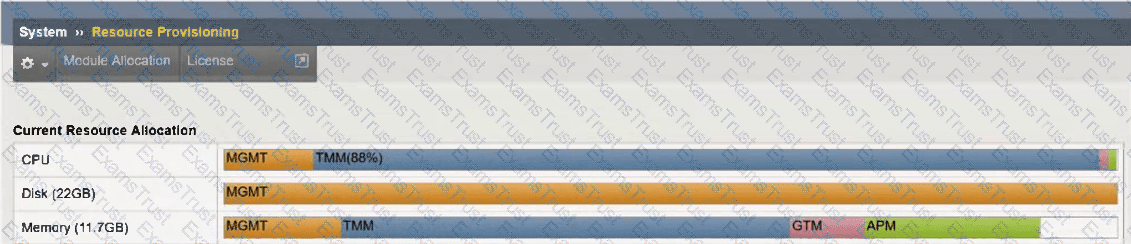
Refer to the exhibit.

An organization has purchased a BIG-IP license that includes all available modules but has chosen to provision only the modules they require.

The exhibit displays the current resource allocation from theSystem → Resource Provisioningpage.

Based on the information provided, which F5 modules have been provisioned?

Options:

A.

LTM, APM

B.

DNS, APM

C.

LTM, DNS, APM

D.

TMM, DNS, APS

Question 4

Which configuration file can a BIG-IP administrator use to verify theprovisioned modules?

Options:

A.

/config/bigip.license

B.

/config/bigip_base.conf

C.

/config/bigip.conf

D.

/var/local/ucs/config.ucs

Question 5

The monitoring team reports that the SNMP server is unable to poll data from a BIG-IP device.

What information will help the BIG-IP Administrator determine whether the issue originates from the BIG-IP system?

Options:

A.

The “Port Lockdown” setting is preventing the SNMP server from polling data from the BIG-IP.

B.

The “Traffic Group” setting must use a floating Traffic Group.

C.

The “VLAN / Tunnel” setting must allow All Vlans.

D.

The configuration on the exhibit is correct and other options should be explored.

Question 6

A BIG-IP Administrator needs to install aHotFixon a standalone BIG-IP device.

The device currently hasHD1.1as the Active Boot Location.

The administrator has already reactivated the license and created a UCS archive.

In which sequence should the administrator perform theremaining steps?

Options:

A.

Install HotFix in HD1.2, Install base Image in HD1.2, Activate HD1.2

B.

Install HotFix in HD1.1, Reboot the BIG-IP device, Install UCS Archive

C.

Install base Image in HD1.2, Install HotFix in HD1.2, Activate HD1.2

D.

Activate HD1.2, Install base Image in HD1.2, Install HotFix in HD1.2

Question 7

The device is currently onv15.1.2.1.

The BIG-IP Administrator needs to boot the device back tov13.1.0.6to gather data for troubleshooting.

The system shows:

Sys::Software Status

Volume Product Version Build Active Status Allowed

HD1.1 BIG-IP 15.1.2.1 0.0.10 yes complete yes

HD1.2 BIG-IP 13.1.0.6 0.0.3 no complete yes

Which is the correct command-line sequence to boot the device to version13.1.0.6?

Options:

A.

Use tmsh to select a new boot volume, tmsh reboot HD1.2

B.

switchboot -b HD1.2, then reboot

C.

switchboot -I HD1.2, then reboot

D.

Use tmsh to select a new boot volume, tmsh switchboot HD1.2

Question 8

An administrator is in the process of reactivating the license using the interface displayed in the exhibit.

What is the address of the license server to which the BIG-IP device must be able to establish an outbound connection in order to use theAutomatic Activation Method?

Options:

A.

license.f5.com

B.

callhome.f5.com

C.

ask.f5.com

D.

activate.f5.com

Question 9

A BIG-IP Administrator discovers malicious brute-force attempts to access the BIG-IP device on themanagement interfacevia SSH.

The administrator needs to restrict SSH access to the management interface.

Where should this be accomplished?

Options:

A.

Network > Interfaces

B.

Network > Self IPs

C.

System > Configuration

D.

System > Platform

Question 10

The Port Lockdown feature prevents unwanted connection attempts to a Self IP.

Which three types of connection attempts areunaffectedby Port Lockdown settings?

Options:

A.

Defined virtual server traffic, Secure Shell (SSH), Centralized Management Infrastructure (CMI)

B.

Centralized Management Infrastructure (CMI), Secure Shell (SSH), Internet Control Message Protocol (ICMP)

C.

Defined virtual server traffic, Internet Control Message Protocol (ICMP), Centralized Management Infrastructure (CMI)

Question 11

What are the two options for securing a BIG-IP’s management interface?

(Choose two.)

Options:

A.

Limiting network access through the management interface to a trusted/secured network VLAN.

B.

Block all management-interface administrative HTTPS and SSH service ports to prevent access.

C.

Use the BIG-IP’s Self-IP addresses for administrative access rather than the management interface.

D.

Restrict administrative HTTPS and SSH access to specific IP addresses or IP ranges.

Question 12

Which two items demonstrate thecreation of a new volumefor software images?

(Choose two.)

Options:

A.

tmsh install software image /shared/images/BIGIP-.iso volume HD1.5 create-volume

B.

tmsh install /sys software image BIGIP-.iso volume HD1.5 create-volume

C.

Using the GUI, go toSystem > Disk Management, selectNew Volume. In the pop-up window, type the name or number of the new volume and clickApply.

D.

tmsh install sys software image /shared/images/BIGIP-.iso volume HD1.5 create-volume

E.

Using the GUI, go toSystem > Software Management > Available Images > Install, and in the Install Software Image pop-up window, type the new volume name or number and clickInstall.

Question 13

A BIG-IP Administrator upgrades the BIG-IP LTM to a newer software version. After the administrator reboots into the new volume, the configuration fails to load.

Why is the configuration failing to load?

Options:

A.

The upgrade was performed on the standby unit.

B.

The license needed to be reactivated before the upgrade.

C.

A minimum of at least two reboots is required.

D.

Connectivity to the DNS server failed to be established.

Page: 1 / 5
Total 46 questions